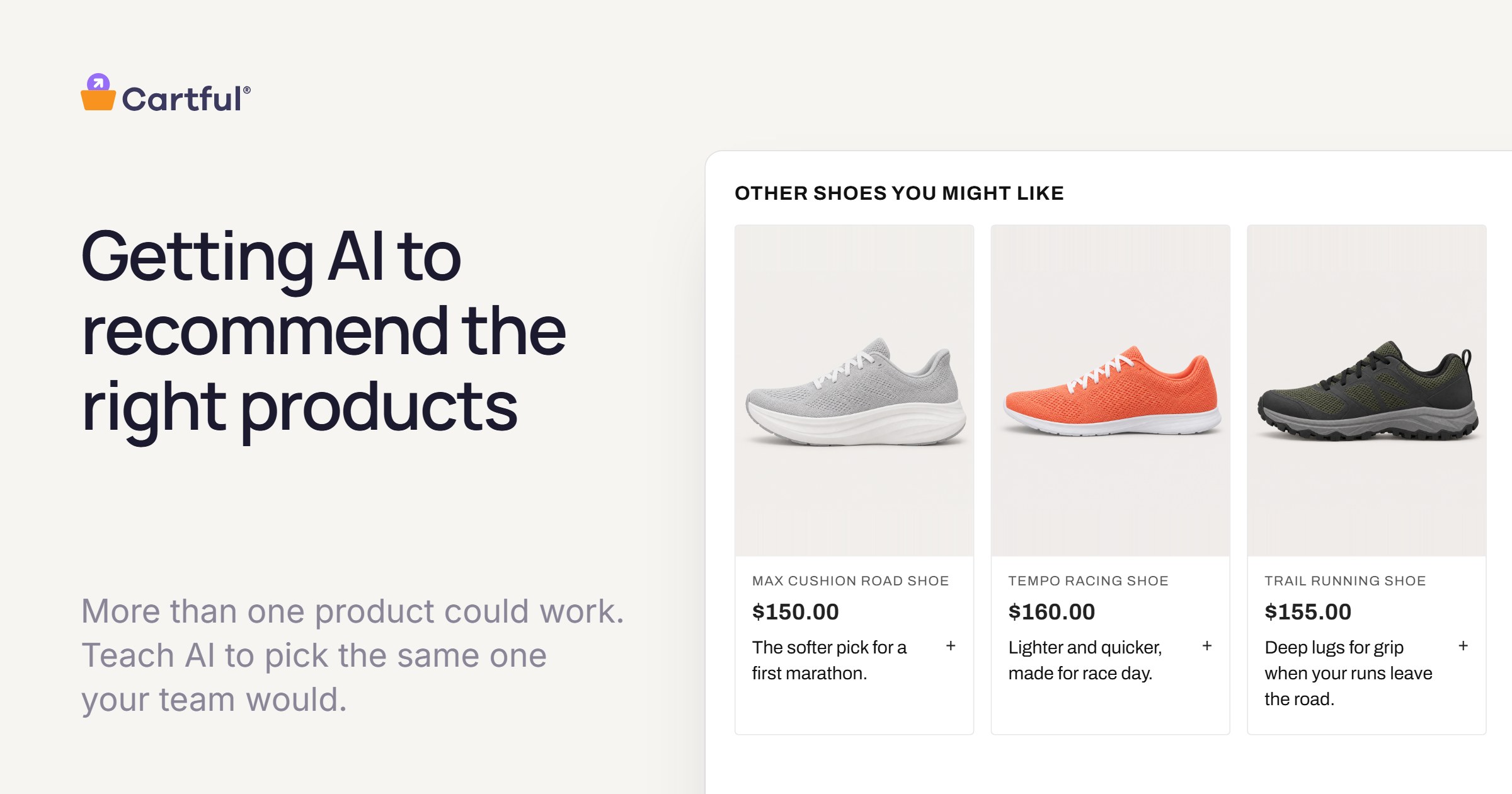
Say a runner types this into ChatGPT or Google’s AI Mode: “Find me a cushioned shoe for training for my first marathon, mostly roads, under $160.” They get back three picks, each with a sentence on why.
If one of those shoes is yours, that sentence is doing the job a good sales associate would do in your store. So it’s worth knowing where it came from.
That sits behind a question we hear from ecommerce teams all the time: how do we get ChatGPT and other AI assistants to recommend our products correctly? The place to start is what an assistant actually reads.
Where an AI assistant learns about your products
When an assistant like ChatGPT, Gemini, Perplexity or Copilot helps someone shop, it draws on three kinds of information.
- The product data you share. Feeds and catalog connections, like the feed you send Google Merchant Center: titles, descriptions, prices, availability, and attributes like material, color and size.
- Your product pages. The copy, the specs and the FAQ.
- Everything else that’s public. Reviews, articles, comparison sites, forum threads.
None of them say how they weigh these, and the details keep changing. But between them, a good assistant can build a very complete picture of what each of your products is.
What it has to work out on its own
For most shopping questions, more than one product could work. The hard part is knowing which one is ideal for this person, and that’s where your team’s judgment comes in. Leaving that call to the assistant can mean a recommendation different from your team’s, or, even worse, your product not making the shortlist at all because other products spoke more clearly to the shopper’s need.
Take the runner. Several of your shoes are cushioned, built for roads and under $160, and a good assistant will find all of them. Your team knows which one is right for a first marathon, and which is better for someone chasing a faster time.
Modern AI assistants are excellent at making inferences to give the best possible answer with the information they have. But here, the assistant has to make a pretty significant judgment call of its own: what makes a shoe good for a first marathon? In the best case, you’ve said something about that on your blog, or even better, in your product data itself. More likely, the assistant will make some smart assumptions from everything else it has read, either directly or by piecing together other sources.
What matters is whether those assumptions are accurate for your brand on this question. Is what makes a good first-marathon shoe for your competitor the same for you? You might put first-timers in your most cushioned shoe, based on your team’s experience fitting thousands of runners. Most product data has no field built for reasons like that, so they rarely end up anywhere an assistant reads.
What you can do about it
- Answer the question yourself. Take the questions your shoppers actually ask, like “what’s a good shoe for my first marathon?”, and write down your team’s answer: which of your products is ideal, who it isn’t for, and why.
- Say it the way shoppers ask it. Don’t make the assistant work for it. A shopper asks for “a shoe for my first marathon,” not “38 mm stack height.” If the assistant has to translate your specs into the shopper’s words, it’s back to making that judgment call on its own.
- Put it where assistants read. Keep it as structured fields on each product, so it stays tied to the product it describes. Then add it to the product feeds you send (Google’s feed now has a question-and-answer field meant for AI answers) and to the text on your product pages.
- Keep it reviewed. Products change, ranges change, and so does your team’s thinking. Now and then, ask a few assistants your shoppers’ questions and see whether your team’s answer comes through.
The same answer serves two shoppers
Some purchases people hand to an agent, and others they want to make themselves (we wrote about that split in Chosen vs. Delegated Shopping). The runner asking an assistant and the one reading your product page late at night need the same answer: which shoe is ideal for a first marathon, and why. If your team’s judgment is written down once, both can work from it.
How Cartful helps
This is the work Cartful does with brands. We start from what you already have (product data, product pages, spec sheets and reviews) and work out who each product is right for, who it isn’t, and why, in the words your shoppers use. Your team reviews every answer and has the final say.
Off your site, it’s your data. Your team’s answers are written into your own Shopify product listings as structured fields, and you can export them as a CSV to add to the product feeds you send Google and other channels. Every brand’s feeds are different, so you decide what goes where.
On your site, the same answers work for shoppers directly: a straight answer on the product page about whether a product is right for them, a reason next to every recommendation, and a few quick questions that lead to the right product.
Assistants will keep changing how they shop, and nobody can promise what any one of them will say. But when an assistant reads about your products, your team’s answer can be there for it to find.
Want to see what an assistant reads about your products today, and what your team would add? Let’s talk.