The short answer
AI shopping agents like ChatGPT, Gemini, Perplexity and Copilot work from your product feeds, your product pages and what the rest of the web says about you. To give them what they need:
- Make the facts complete, current and consistent everywhere they appear.
- Write down your team’s answer to who each product is right for, who it isn’t for, and why, in the words shoppers use.
- Put that answer where agents read: your product pages, your feeds and, on Shopify, the product data you share with Shopify Catalog.
Most guides cover the first step well. This one spends more time on the second and third, because we think the answer to “which one is right for me?” should come from your team, and that’s the part most catalogs leave out.
What a shopping agent works from
When someone asks an assistant to help them shop, it usually draws on three places:
- Product feeds and catalog connections. Google draws on the Merchant Center feeds brands send it. OpenAI publishes its own product feed spec for ChatGPT. Shopify stores can share their products through Shopify Catalog, from the Agentic sales channel in Shopify admin.
- Your product pages. The text, specs, FAQs and product markup an agent can read when it visits.
- The rest of the web. Reviews, articles, comparison pages and forum threads.
None of the assistants say exactly how they weigh these, and it keeps changing, so the safest plan is to be clear and consistent in all three.
Step 1: Get the facts complete and consistent
This is the part most advice covers, and it matters. Agents compare products attribute by attribute, so gaps and contradictions work against you.
- Fill in the attributes shoppers filter on: size, material, capacity, compatibility, and whatever matters most in your category.
- Give each purchasable variant its own record, with identifiers like GTINs where you have them.
- Keep price and availability current, and the same in your feed as on your page.
- Use the same product names everywhere.
- Add standard product markup (schema.org Product and Offer) to your product pages so the basics are easy to read.
Once that’s in place, an agent can tell what each of your products is. The next step is about which one is right for a particular shopper.
Step 2: Write down your team’s judgment
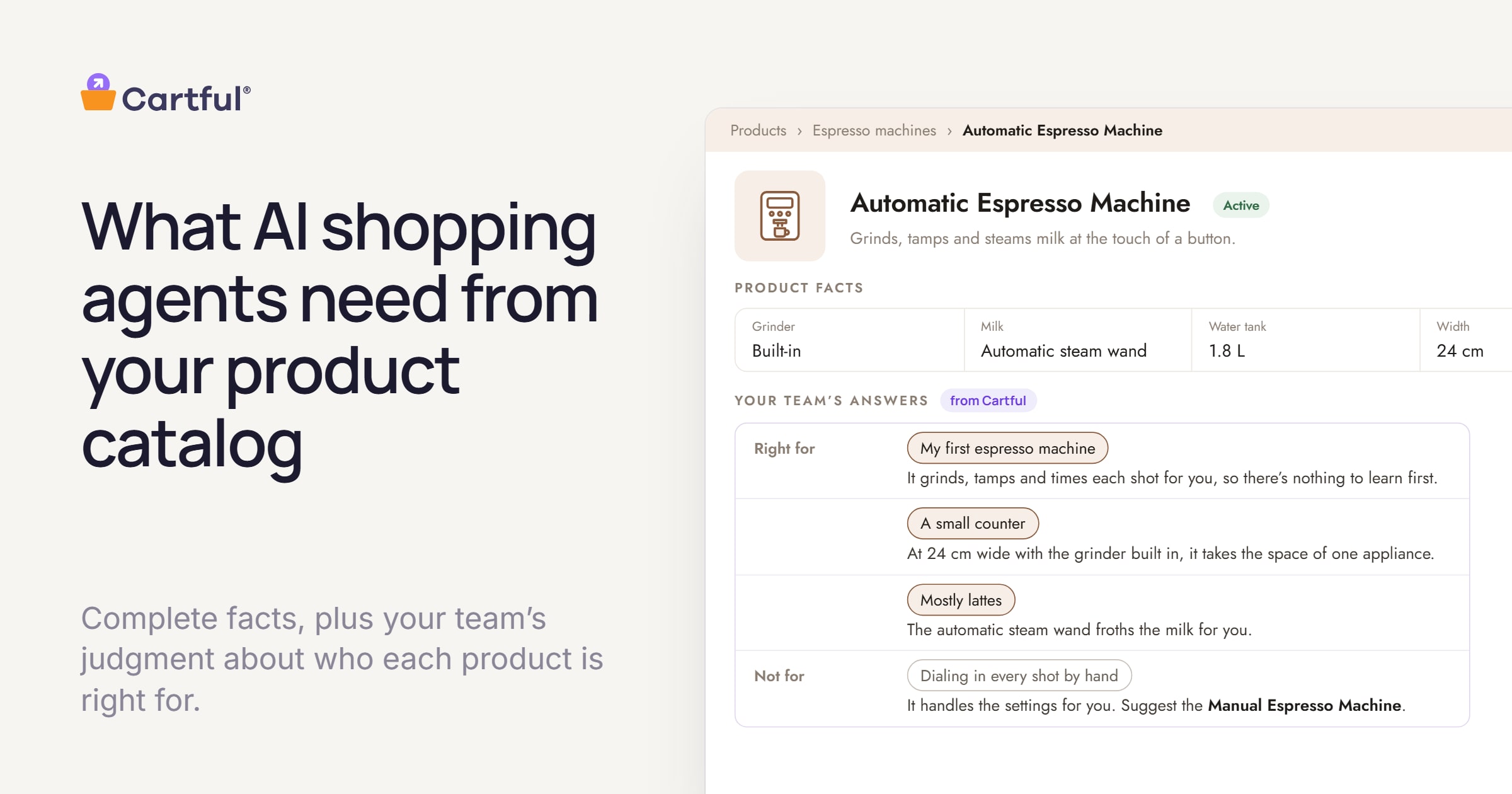
Say someone asks an assistant, “I’ve never made espresso before and my kitchen is small. Which machine should I get?” A good assistant will find every compact machine you sell. Deciding which one is right for a beginner takes judgment. An all-in-one with a built-in grinder saves counter space, while a separate grinder leaves more room to grow. A fully automatic machine is easier to learn but gives less control. A steam wand matters a lot to someone who drinks lattes, and not at all to someone who doesn’t.
Your team makes judgment calls like these every day, from years of answering customers. They rarely end up in a feed, because most product data has no field for them. Assistants are good at piecing together an answer from everything else they read, but we think the answer to “which one is right for me?” should come from the people who know your products best.
So for each product, write down:
- Who it’s right for, the way a shopper would put it: “my first espresso machine,” “a small counter,” “mostly lattes.”
- Who it isn’t for, and what you’d suggest instead.
- Why, in a sentence a shopper would understand.
Write it in shoppers’ words. People ask agents about their situation in full sentences, not in spec terms. If your product data says “15-bar pump” and the shopper says “I’ve never done this before,” the agent has to connect the dots on its own. When your team’s answer is written down plainly, the agent has less work to do, and your product is easier to recommend.
Step 3: Put it where agents read
Keep the answers as structured fields on each product (Shopify metafields, or attributes in your product information system), so each one stays tied to the product it describes and is easy to reuse. Then make sure it travels:
- Your product pages. Show it as text shoppers can see, such as a short “who it’s for” section or an answer in the product FAQ. Agents that visit the page read what’s there, and shoppers get the same answer.
- Google. Add your products to Google Merchant Center, from a file, Google Sheets or a connection to your ecommerce platform. Its question-and-answer attribute is meant for conversational experiences like AI Mode in Google Search, and your team’s answers to common shopper questions fit there.
- ChatGPT. If you sell through Shopify or Etsy, your catalog is already connected to shopping in ChatGPT. Other brands apply to share a product feed that follows OpenAI’s product feed spec, and OpenAI’s merchant page explains how to apply and where it’s available.
- Shopify Catalog. If you’re on Shopify, custom fields don’t flow into Shopify Catalog on their own. On the Channel mapping page (Sales channels, then Agentic, then Shopify Catalog), you can change the source of the product description to a metafield, or combine it with one, so the answer travels with the product.
- Other feeds and marketplaces. Most feed tools can map a custom field into a description or an attribute.
How Cartful helps
This is the work we built Cartful for. We start from what you already have (product data, product pages, spec sheets and reviews) and draft who each product is right for, who it isn’t, and why, in the words your shoppers use. Your team can review, edit and override all of it.
Off your site, it’s your data. Your team’s answers are written into your own Shopify product listings as structured fields, and you can export them as a CSV to add to the product feeds you send Google and other channels. Every brand’s feeds are different, so you decide what goes where.
On your site, the same answers work for shoppers directly: a straight answer on the product page about whether a product is right for them, a reason next to every recommendation, and a few quick questions that lead to the right product.
If you’d like to see what that looks like on your own catalog, we’re happy to walk you through it.
Frequently asked questions
Is a complete product feed enough?
It’s the foundation. A complete feed tells an agent what each product is. It usually doesn’t say which product is right for which shopper, so add your team’s answer to that as well.
Do AI assistants read Shopify metafields?
Not automatically. Metafields reach agents when you show them on your product pages, map them into the product data you share with Shopify Catalog, or add them to a feed you send.
Should we write for AI agents or for shoppers?
For shoppers. An agent is answering a shopper’s question, so the words a good sales associate would use are the ones that help most.