The short answer
When you’re comparing AI shopping tools, these five questions help you see how each one would work with your products and your team:
- Who gets the final say on which product is right for which shopper?
- What happens when you disagree with a recommendation?
- Can every recommendation be explained?
- Where does your product knowledge live, and can you take it with you?
- What about the shoppers who never open a chat?
Good vendors will be glad you asked, and happy to show you the answers on your own products.
A lot of the ecommerce teams we talk to are looking at AI shopping tools right now. Some answer shoppers’ questions in a chat. Some explain recommendations on the product page. Others help get your products recommended in ChatGPT and other AI assistants. Most of them demo well, because the demo is built on products the vendor chose.
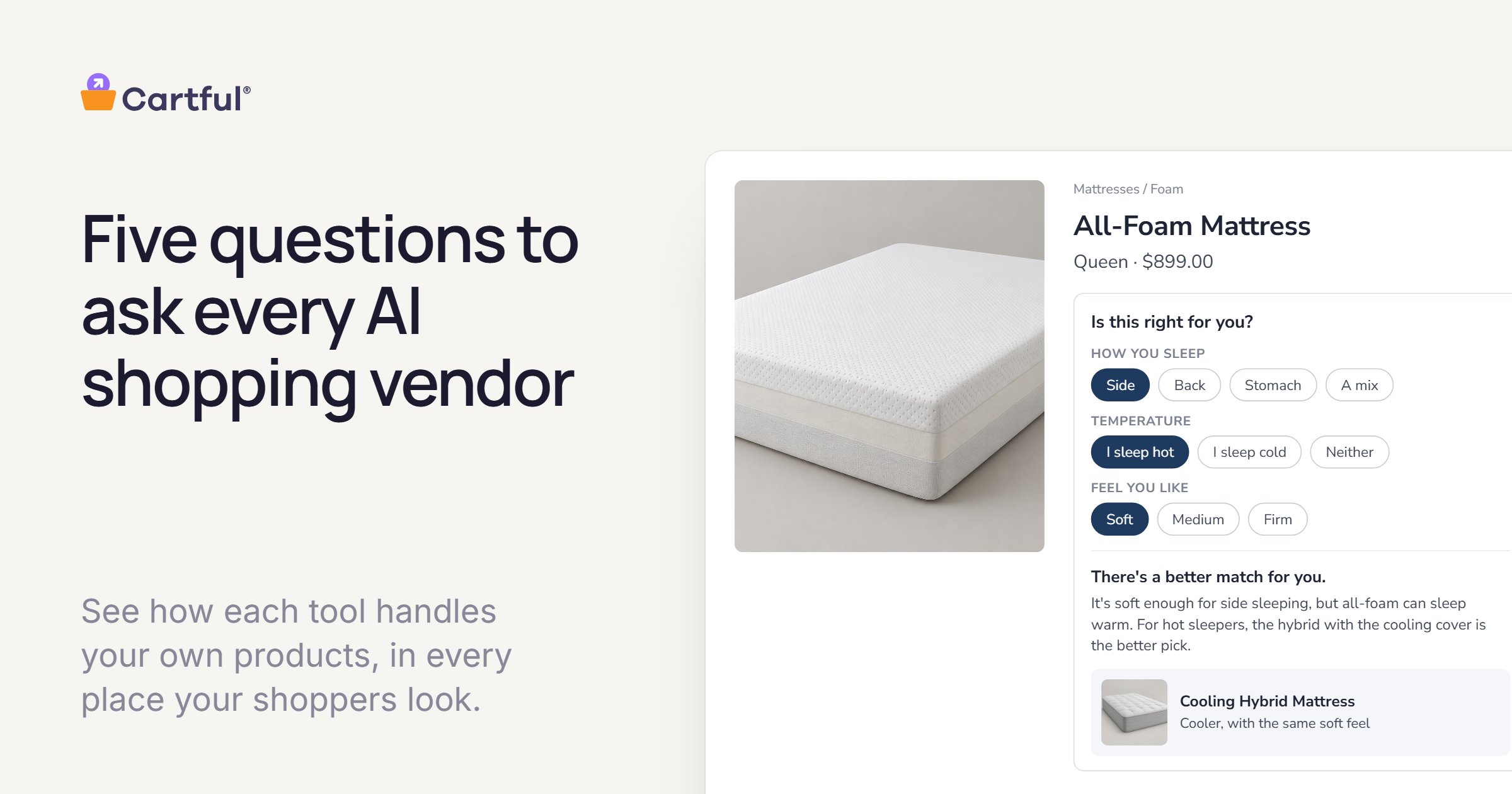
What’s harder to see in a demo is how a tool will handle your products, on the questions your team knows best. Say a shopper who sleeps hot, on their side, asks which of your mattresses to buy. Three of them would work. Your team knows the all-foam one gets the best reviews, that it can sleep warm, and that the hybrid with the cooling cover is the better pick for most hot sleepers. A good recommendation depends on that kind of knowledge.
Our view is that the people who know the products should decide what AI recommends, and these five questions come from that view. We keep a short version on our homepage. Here’s the longer one, with what a helpful answer looks like and what to ask to see.
1. Who gets the final say?
Every tool in this space uses AI. Where they differ is where the judgment comes from. Some work it out from your catalog, your reviews and how shoppers behave. Others start from guidance your merchandising team has reviewed. Both approaches can work well, but the difference shapes how much your team can see and change before shoppers do.
A helpful answer shows you where your team would review which products are right for which needs, and explains what happens to products nobody has reviewed yet.
Ask to see a product your team knows well, what the tool would say about it, and how you’d change that.
2. What happens when you disagree with a recommendation?
There will be times your team sees it differently, so it’s worth knowing what a fix involves. Depending on the tool, that might mean retraining a model, adding a line to a prompt, opening a ticket, or waiting for new data to shift the results. Some of those fixes only cover one case, or one place on your site.
A helpful answer: you change it once, in plain language, and every place that uses it updates. It’s also worth asking who on your team can make the change, and how soon shoppers see it.
Ask to see one recommendation being changed, from start to finish.
3. Can every recommendation be explained?
A reason is what makes a recommendation useful. “Lighter, if you’re hiking long miles” tells a shopper something that “you may also like” doesn’t. Reasons also give your team a way to check the work, because you can agree or disagree with a reason in a way you can’t with a score.
A helpful answer: each recommendation comes with a specific reason, your team can review and change it, and the reason a shopper sees sounds like your brand.
Ask to see the reasons behind a few of the recommendations in the demo.
4. Where does your product knowledge live?
Over time, any AI shopping tool builds up knowledge about your products: who each one is for, who it isn’t for, and how they compare. It’s worth knowing where that knowledge is kept. If it only lives inside one vendor’s system, your other tools can’t use it, and you’d have to rebuild it if you ever switched.
A helpful answer: the knowledge is yours, your team can read and export it, and it can go where other systems already read your product data, like your commerce platform and your product feeds.
Ask what you’d keep if you moved on next year, and in what format.
5. What about the shoppers who never open a chat?
Shoppers rarely make a decision in one place. Someone might ask ChatGPT for ideas, read your product page, take a quiz, and then ask a question in chat before they buy. If each of those runs on its own logic, they can hear different answers along the way, and it’s hard to trust any of them.
A helpful answer: every place reads from the same product knowledge, so the product page, the quiz, the recommendation row, the chat and the AI assistants that read your product data all give the same answer.
Ask which places would change if you changed one recommendation.
Getting the most from the conversation
None of these questions are technical, and most vendors will be glad to answer them. The most useful thing you can do is bring a few of your own products, especially ones your team has strong views about, and ask to see the answers on those. That will tell you more than a demo built on someone else’s catalog.
How Cartful answers the five
We built Cartful around these questions, so here’s how we’d answer them.
- The final say. Cartful drafts a library of who each of your products is right for, who it isn’t, and why, from your product data, product pages, spec sheets and reviews. Your team can review and edit any of it, and decides what goes live.
- When you disagree. You edit it once, in plain English, and every Cartful experience that reads from it updates, without retraining a model or adding to a list of prompt instructions.
- Explained. Every answer traces back to the reason behind it, and your team can change that reason at any time. Shoppers see it in your brand’s voice.
- Ownership. It’s your data. Your team’s answers are written into your Shopify product listings as structured fields, and you can export them as a CSV for the product feeds you send to Google and other channels. You decide where they go. Cartful also works on other platforms, anywhere we can add a script and read a product feed.
- Beyond chat. One library powers Affinity (a straight answer on the product page about whether a product is right for this shopper), Lineup (other options and what goes with it, each with a reason), quizzes and product finders, and Agentic Training (your team’s answers written where AI shopping agents read them). Chat, coming in Q1 2027, will read from the same library.
Frequently asked questions
What counts as an AI shopping assistant?
Anything that uses AI to help a shopper pick a product: chat on your site, guidance on the product page, recommendation rows, quizzes and product finders, and the assistants shoppers use off your site, like ChatGPT, Gemini and Perplexity. These five questions apply to all of them.
Can a brand control how ChatGPT recommends its products?
No one controls what ChatGPT or any other assistant says. What you can influence is what it reads: your product data, your product pages and the feeds you send. When your team’s knowledge is there, in the words shoppers use, the assistant has a better source to work from. We wrote more about this in How to Get ChatGPT and Google to Recommend the Right Products.
If I can only ask one question, which should it be?
Start with the first. Knowing who has the final say usually tells you a lot about the other four.
Do these questions apply to product quizzes and recommendation tools too?
Yes. Any tool that suggests which product a shopper should buy is making a judgment call on your brand’s behalf, so the same questions apply.
If you’d like to see how Cartful answers these on your own products, we’re happy to walk you through it.